
Ostler: an open-source MCP browser for research, web tasks and forms that checks its own work
Ostler is an open-source Model Context Protocol (MCP) browser server for Claude Code, Codex, Cursor and any MCP client. It reads pages, researches questions, tests web apps and fills forms. Research answers cite only pages it actually read, with every quote verified, and forms are filled in one call with every value read back. Qdrant remembers what worked. It runs locally, in Chrome on your machine. Quote matching is not fact-checking, and filling a form is not permission to submit it. See the recipes.
Needs Python 3.8+ and Chrome or Chromium; no Rust. Also: uvx --from ostler-mcp ostler serve, the macOS/Linux install script, or build from source with Cargo.
No Rust? Get started without programming, or install from PyPI (pip install ostler-mcp or uvx --from ostler-mcp ostler serve), Open VSX (Cursor, Windsurf; VS Code Marketplace coming), npm, crates.io, Homebrew or GitHub releases. PyPI, GitHub releases and Open VSX are live (v0.2.0); npm, crates.io and Homebrew are coming. A listing that shows “not found” is not published yet.
- Quotes cited only if they are on a page it read
- Unreadable pages reported as gaps
- Every fill verified by read-back
- Domain allowlist enforced in the browser
- CAPTCHAs handed to you, never solved
Real output from the bundled synthetic research pages (ostler fixtures), trimmed: URLs shortened, untrusted-content fences removed. cite proves the words are on the page, not that the claim is true. Search providers are tested against mock servers only. The research recipe · tool reference
--tools auto)Local fixtures, one Apple M2, a scripted agent with no LLM in the loop. The 3 vs 22 comparison is Ostler's form engine against the same engine driven one field at a time, not another product. What is measured so far is browsing speed and forms. Research has tests and real transcripts but no accuracy benchmark yet. Read the caveats.
What it does
One browser for reading, researching and acting, with each result checked
Ostler is a general MCP browser first. Two checked layers sit on its 16 core tools: research that refuses to cite what it did not read, and a form engine that reads every value back. Optional memory in Qdrant, and A2A for handing work to other agents, sit beside them.
Read and research
read returns the best passages of a page, cite marks a quote VERIFIED only if its words are on a page read this session, and evidence lists what could not be read. open_many, search, extract and links gather sources.
Browse and test web apps
navigate, snapshot, click, type, tabs, screenshots and look, which boxes and numbers every clickable element. Compare pages, check a web app after a change, get past a cookie wall, log in once with --profile-dir, and hand a CAPTCHA to a person. No form or research tools needed.
Fill forms
form_inspect, form_fill and form_submit: a whole form in one call, dependent dropdowns and wizards handled, every value read back from the live page, and the submit result reported separately from the fill.
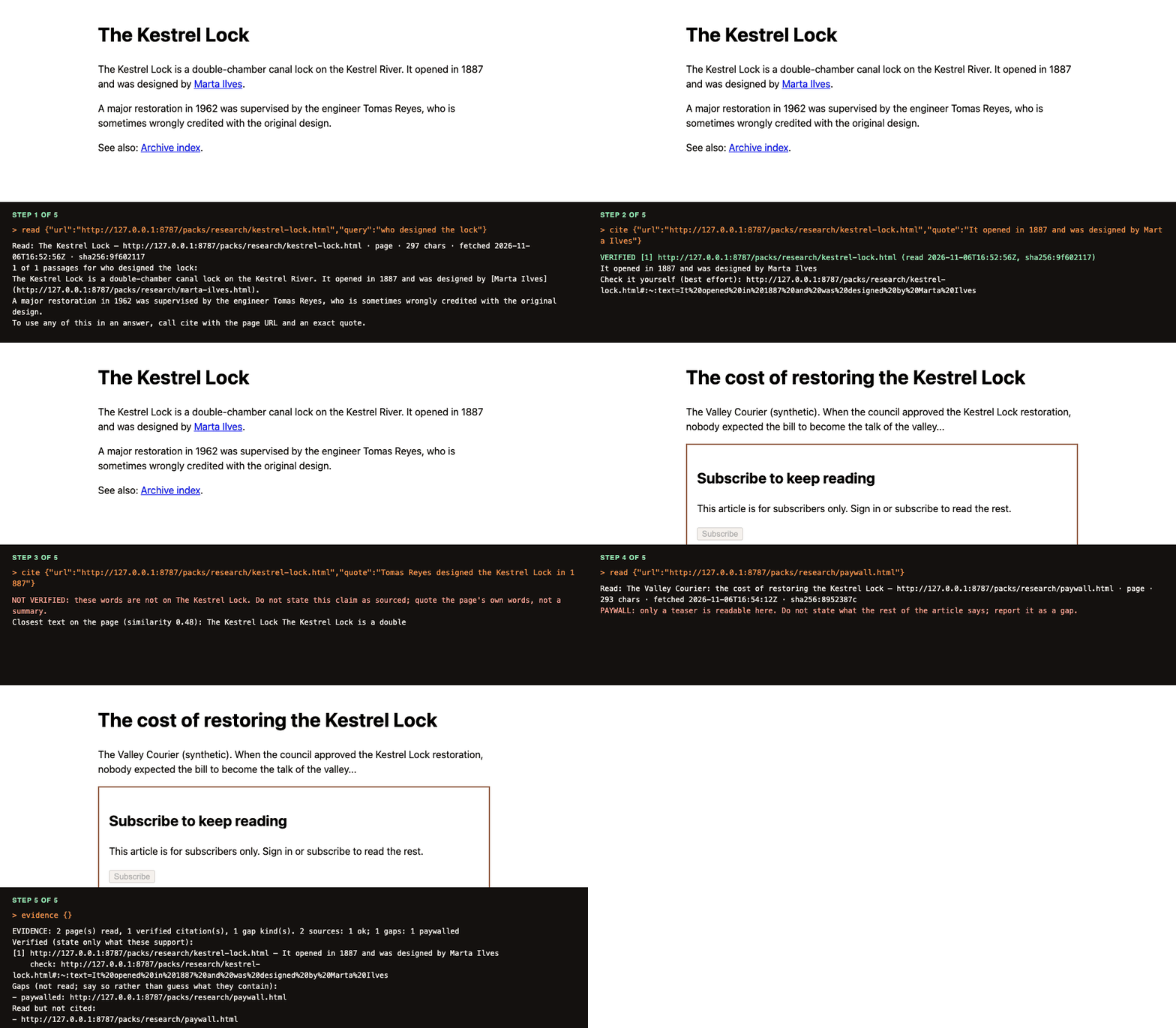
read, then cite (a real quote is VERIFIED, a decoy is not), then evidence reports the paywalled page as a gap. Real tool replies from the bundled demo pages (<page_content> wrappers omitted).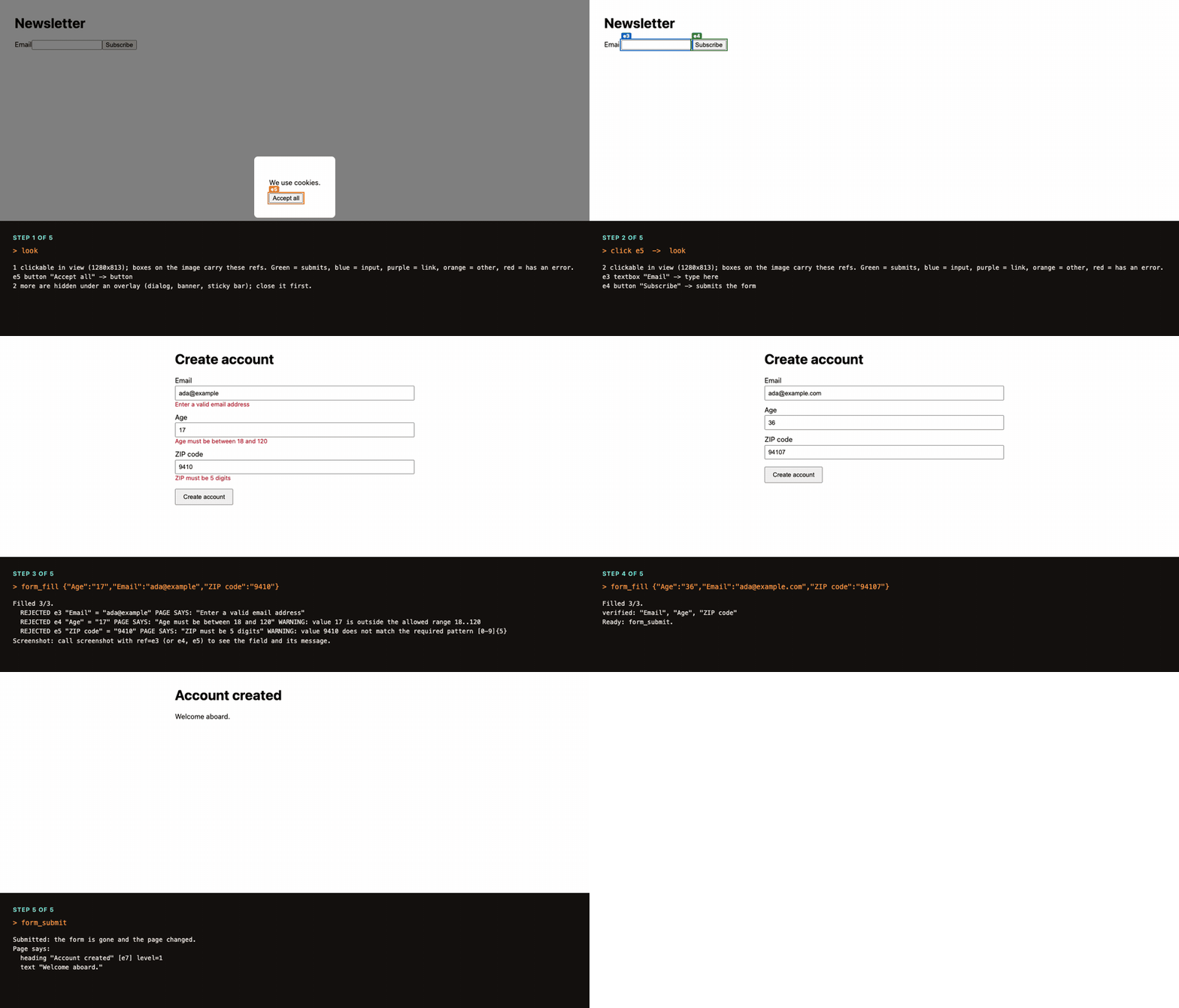
look under a cookie wall, one form_fill call read back with the page's three validation errors, then the corrected fill and the submit result. Real tool output; nothing real is submitted.Deep research
Research answers that cite only what was read
A page-to-markdown API hands the agent text and trusts it to quote honestly. Ostler keeps the session: it remembers every page it read, checks every quote against it, and tells the agent what it could not read. The workflow, with real tool output →
Cheap, focused reads
read with a query returns only the best passages, ranked locally (BM25 and MMR), so a page costs a few hundred tokens instead of the whole text. open_many reads up to 10 pages in a scratch tab and obeys robots.txt.
Citations that are checked
cite says VERIFIED only if the quote's words are on a page read this session, and returns a link that highlights them. A claim the page does not make is refused, with the closest text shown. If the page changes, earlier citations are marked stale.
Gaps, not guesses
Paywalls, bot walls, robots.txt refusals and errors are recorded, never silently dropped. evidence lists them next to the verified citations, so the answer can say what it could not read. Text aimed at the agent is flagged, not obeyed.
Built for what agents get wrong
Easier to use correctly, harder to use against you
Six things that make a page easier for an agent to use correctly, and harder to use against it.
✓Verified, not assumed
After writing a field, Ostler reads the value back from the live page and compares it by field type. A date the page rewrote, or a combobox that picked a longer, different option, is reported as a failure. Only exact matches and genuine reformatting such as (555) 123-4567 pass. When the page was still busy at the end of a fill, the report says so.
◎Shows where to click
The look tool returns a screenshot with every clickable element boxed and numbered from the DOM, plus a legend: e6 button "Send" → submits the form. Elements hidden under a cookie banner or modal are left out and counted, so the agent closes the overlay first.
!Catches errors you can only see
Red borders, red text under a field, and toast banners are reported as errors even when the page sets no aria-invalid. An error that was already on a field before the fill is flagged, so it is not mistaken for a new one.
✋Hands CAPTCHAs to a person
A reCAPTCHA, hCaptcha or Turnstile wall, or a "verify you are human" page, is reported at the top of the result so the agent stops retrying. wait_for_human waits while you solve it in the window, and A2A tasks come back input-required. Ostler never solves or bypasses them.
👁Ignores text you cannot see
Instructions aimed at agents are often hidden: opacity 0, a zero font size, text pushed off the page, or white on white. Ostler leaves that text out of what the model reads and says how many runs it dropped. It does not stop a model being persuaded by text a person can also see.
⇄Tabs, A2A, one notepad
Popups arrive as tabs under the same policy. Other agents can hand over a form through A2A v1.0 and get input-required back when something is missing or needs your confirmation.
Forms
Forms: where agents are slow and costly, and the browser is not why
Two reasons, neither of which is "the browser is slow".
One call per field
Typical tools make the model click, type, and re-read the page for each field. A 20-field form is 20+ turns, and every turn re-reads the whole conversation.
Forms are tricky
Dependent dropdowns that load asynchronously, wizards, input masks, controlled components that ignore a plain .value =, custom comboboxes, shadow DOM, iframes, silent validation.
Amnesia
Every session starts from zero: the same site quirks rediscovered, the same personal details asked for again, the same validation mistakes repeated.
Forms, how it works
Four calls cover most forms
The model states intent; the engine does the mechanics, reports what actually happened, and learns from it.
- ResolveKeys match a field by ref, name, label or fuzzy label. If two fields match equally well, it asks instead of guessing.
- Fill and verifyFields are filled in document order, re-inspected after each (so dependent controls appear), then read back from the page.
- LearnEvery verified fill is a lesson. Mappings that work gain wins, mappings that fail are dropped, and after a site redesign what was learned carries over. Playbooks keep the structure (which fact fills which field), not the values you typed.
navigate  →  page state with interactive elements (no separate snapshot call)
form_inspect  →  typed fields: kind, label, required, options, current value, errors
                 + "this form was filled successfully 3x before; known issue: ZIP must be 5 digits"
form_fill {"Country":"Germany","State":"Bavaria","Date of birth":"March 5, 2001"}
  OK  e4 "Country" = "de"
  OK  e5 "State / region" = "by"          ← appeared after Country was set
  OK  e7 "Date of birth" = "2001-03-05"
form_submit → Submitted | Advanced (next step) | NOT SUBMITTED + the page's messagesMemory and privacy
Optional memory: saved facts, playbooks and privacy limits
Memory is optional and lives in your own Qdrant. It refuses secret-looking values (detection is heuristic), and the newest features encrypt it on your machine first.
What it keeps
Facts you saved, per-site playbooks (which fact fills which field, not the values you typed), and episodes (what went wrong, redacted). Secret-looking values are refused (detection is heuristic), sensitive fields are never auto-filled from memory, and records are scoped per tenant.
What is stored →Sealed before upload Unreleased
Facts, playbooks and episodes are encrypted on your machine with AES-256-GCM before they reach Qdrant. Site names, field labels and profile keys become keyed hashes. Back up the key: there is no recovery.
What is hidden and what is not →Local embeddings Unreleased
--embeddings ollama embeds text on your machine so only vectors reach Qdrant. With Qdrant Cloud Inference, field text is sent to Qdrant to be embedded.
Per-tenant tokens Unreleased
--isolation collection gives each tenant its own collections, and ostler memory token mints a JWT Qdrant itself limits to them. A leaked client token exposes one tenant, not the cluster. Tested on Qdrant 1.20.
Engineering choices
Each choice has a written record, and a cost
Each choice has a decision record in the repo with the alternatives we rejected.
An injected runtime, not the accessibility tree
One script runs inside every page. It walks shadow DOM and same-origin iframes, assigns stable refs, and answers in one round-trip what would take dozens of protocol calls.
Why: fewer round-trips and one code path for shadow DOM. Cost: it shares a JS world with the page; closed shadow roots and cross-origin frames are invisible.
Wait for work, not for time
The runtime counts in-flight fetch/XHR and short timers and waits until the page is quiet and nothing is pending. No fixed sleeps.
Why: sleeps are either flaky or slow. Lesson: our own polling was counted as page activity and cost 3 s per action until a benchmark caught it. A regression test now guards it.
Observation is part of the action
Navigation returns the interactive elements; clicks and typing return only what changed. Tool schemas are capped at 7 KB by a test.
Why: saves a call per step and keeps context small. Every byte is re-read on every model turn.
Safety is structural
The domain allowlist holds every request the browser makes (images and WebSockets included) and makes other hosts unresolvable, tested with a canary server. Chrome is driven over a pipe, so there is no debugging port. File fields are refused unless you name a directory, and a page's confirm() is dismissed, not clicked through.
Not claimed: an audit, a DNS-rebinding-proof private-network check, or protection from a model that is persuaded by text a person can see.
Integrations
Works with the agents you already use
Any MCP client can launch ostler serve over stdio. ostler setup prints the exact config with the binary's absolute path.
Building your own agent? LangChain, LlamaIndex and AutoGen load the same tools; each snippet there was run, with no model in the loop.
# 1. install (Python 3.8+ and Chrome required; no Rust needed)
pip install ostler-mcp

# 2. check it works
ostler doctor

# 3. connect Claude Code (writes config automatically)
ostler setup claude --apply
Runs claude mcp add with the binary's absolute path. to paste into Claude Code and let it do the above.
# 1. install (Python 3.8+ and Chrome required; no Rust needed)
pip install ostler-mcp

# 2. check it works
ostler doctor

# 3. print config for ~/.codex/config.toml (paste or merge it)
ostler setup codex
Prints the [mcp_servers.ostler] block using the binary's absolute path. to paste into Codex. More in Use with your agent.
# 1. install (Python 3.8+ and Chrome required; no Rust needed)
pip install ostler-mcp

# 2. check it works
ostler doctor

# 3. print config for ~/.cursor/mcp.json (paste or merge it)
ostler setup cursor
Prints JSON using the binary's absolute path. Full options: Use with your agent.
# 1. install (Python 3.8+ and Chrome required; no Rust needed)
pip install ostler-mcp

# 2. check it works
ostler doctor

# 3. print config for .vscode/mcp.json (paste or merge it)
ostler setup vscode
Prints JSON using the binary's absolute path. Full options: Use with your agent.
Anything else that speaks the Model Context Protocol works with ostler setup json. Other agents can delegate forms over A2A.
See it work
Run ostler fixtures, then tell your agent:
"Open http://127.0.0.1:8787/dependent.html and fill in the shipping form for Ada Lovelace in Germany, Bavaria."
Ostler fills Country, watches State load, reads every value back, and reports what the page said. These are demo pages on your own machine: nothing real is submitted. When you point Ostler at real sites, read the Security model first.
Measured results
Benchmarks: what was measured and what was not
We set out to make a fast browser. Measuring told us the browser is not where the time is. One machine (Apple M2, 8 cores, Chrome 156), local fixtures, localhost Qdrant. Every assumption is a flag on the harness.
| Evidence | What was run | Result | What it does not show |
|---|---|---|---|
| Local fixtures | Ostler's own form engine against 10 of the 49 local form fixture pages, plus concurrency, footprint and a 30-task suite. One Apple M2, Chrome 156. | 3 calls against 22 on a 20-field form, compared with the same engine driven one call per field. Scripted, no LLM. | Not another product, and not the open web. |
| Scripted competitor comparison | The real Playwright MCP 0.0.84 and Chrome DevTools MCP 1.12.0 servers, five tasks on the same local fixtures, using each server's batch fill. Scripted, no LLM. | Ostler 19 steps, Playwright MCP 27, Chrome DevTools MCP 28. All three completed all five tasks. | No model in the loop, no hostile page behaviour, so not a correctness or accuracy advantage. |
| Live practice pages | Seven public form-practice pages, fill only (nothing submitted), 45 fields read back from the page. No LLM. | 44 of 45 fields correct, 1 flagged probe, 0 false claims, after two fixes the first run found. | Small corpus of pages built to be automated. Not a real-website success rate. |
| Task | Browser work | Model turns | End to end |
|---|---|---|---|
| One 3-field form, engine mode | about 0.5 s (4%) | about 12 s (96%), 4 turns | 12.5 s |
| 20-field form, one call per field | 1.1 s | 69 s | 70 s |
--lean, versus 658 MiB default (local fixtures, one machine)| Task | Form engine | One call per field |
|---|---|---|
| Basic contact form | 3 | 6 |
| Dependent dropdowns | 3 | 6 |
| 3-step wizard | 7 | 9 |
| Shadow DOM | 3 | 4 |
| Controlled inputs | 3 | 5 |
| Custom combobox | 3 | 3 |
| Long form (20 fields) | 3 | 22 |
| Measure | 1 | 2 | 4 | 8 | 8 with --lean |
|---|---|---|---|---|---|
| Tasks per minute | 79 | 150 | 262 | 354 | 393 |
| Memory per session, MiB (default / lean) | 658 | 412 |
Economics, honestly
Compute is not the cost
~$0.006 per 1,000 tasks of browser compute versus ~$17–24 per 1,000 in LLM tokens. The product's value is fewer turns and fewer tokens, not a cheaper browser.
It scales on one node, with a known unknown
Near-linear to 8 sessions, flat latency. Qdrant retrieval is flat to 200k points, but Qdrant RAM per user (~130–160 KB untuned at 20 facts) needs a sizing study before any capacity claim.
The moat is not Rust
agent-browser is already a native Rust CLI with ~45k stars. What can compound is per-user memory, a corpus of form playbooks, and benchmarks others must match. Competitors can add memory; model vendors can ship first-party browsers.
The biggest gap
Real-site success rate. Until that evaluation is published, treat "reliable" as "reliable on the failure modes in our fixtures".
Full write-up →How it compares
How Ostler compares with other MCP browsers
From each project's README and repository metadata (snapshot 2026-10-30; Firecrawl row 2026-11-06; star counts move). We have not run a head-to-head on identical real-site tasks yet. For the one measured comparison, see Ostler vs Playwright MCP.
| Project | Language | Reading and research | Form handling | Memory | Notes |
|---|---|---|---|---|---|
| Ostler | Rust | Query-ranked passages; quotes verified against pages read; gaps reported; local Chrome, logins kept in a persistent profile | Typed model, verified fill, wizards, dependent fields, shadow DOM, same-origin iframes | Qdrant: profile, playbooks, episodes | v0.2; fixtures only; Chrome only |
| Firecrawl | TypeScript (MCP server, MIT; engine AGPL-3.0) | Hosted scrape, crawl, map and search to markdown | Page actions through the API | None | Hosted, billed in credits; built for scale and anti-bot, which Ostler does not do |
| agent-browser (Vercel) | Rust CLI | Snapshots and page text | fill / select / check, command batching | Cookie/storage state, auth vault | Larger and more mature. Closest competitor. |
| Playwright MCP (Microsoft) | Node | Accessibility snapshots | Accessibility snapshots, batch browser_fill_form | Browser profile | Mature and broad |
| chrome-devtools-mcp (Google) | Node | Snapshots, console and network | Automation plus debugging and performance tooling | None | Built for debugging |
| Lightpanda | Zig | n/a (an engine) | n/a (an engine, no rendering) | n/a | Fast engine, AGPL; a possible future backend |
Scope
What Ostler is not
Not proven on the open web
v0.2 is early. It is evaluated on local fixtures built to reproduce known form-filling failures. A real-site success rate has not been published, so read "reliable" as "reliable on the failure modes in our fixtures".
Not a crawler or a scraping API
It reads tens of pages in an agent's session, in one Chrome, one page at a time, and obeys robots.txt. For millions of pages, hosted scale or anti-bot handling, use a crawler. It is not a general-purpose test framework either. It runs Chrome only; Windows and Docker are new and experimental.
Not a CAPTCHA, 2FA or anti-bot tool
It never solves CAPTCHAs (it hands them to you) and does not handle 2FA. Cross-origin iframes and closed shadow roots are not supported.
Not a benchmark winner on real tasks
Our numbers are scripted fixtures, model-free: call counts and bytes, not whether a model succeeds. No head-to-head on identical real-site tasks has been run. It is also not an externally audited security product.
Limits and roadmap
What it does not do yet
Today it does not
Handle cross-origin iframes, closed shadow roots, or 2FA, and it never solves CAPTCHAs (it hands them to you). look covers only the visible viewport. Research reads pages one at a time, has no PDF text layer, does not keep sources across sessions, and its search providers are tested against mock servers only. It runs Chrome only, and is tested on macOS locally and Linux in CI. Windows builds and runs its tests in CI but is experimental; a Docker image is also published.
Next
Head-to-head research benchmark with a real model (answer accuracy, citation precision, tokens per answer) · real-site form evaluation with published failures · sources remembered in Qdrant across sessions · PDF text · live Qdrant Cloud Inference validation · cross-origin frames · an optional Lightpanda backend if it earns its keep.
The design review, with its findings →FAQ
Questions people ask first
What is Ostler?
Ostler is an open-source MCP browser for AI coding agents such as Claude Code, Codex and Cursor. It reads, researches and acts in a real Chrome, and checks its own work: research answers cite only pages it actually read, with every quote verified; forms are filled in one call with every value read back; and Qdrant remembers what worked. It is one local Rust binary that runs Chrome. Ostler sends pages to no third party (a search provider or Qdrant Cloud only if you configure one), but your MCP client may forward tool output to its model provider. Quickstart
What can I use Ostler for?
Three kinds of work, in a real Chrome on your machine. Reading and research: read pages, compare sources, and answer only with quotes that were checked against pages it read (read, cite, evidence, search, open_many). Browsing and testing web apps: navigate, click, type, screenshots, tabs, logins that persist with --profile-dir, and cookie walls and CAPTCHAs handed to a person. Forms: fill a whole form in one call and read every value back. It is not a crawler or a scraping API, and it has not been measured on the open web. What it does · Cookbook
How do I give Claude Code a browser?
Install Ostler with pip install ostler-mcp (or uvx --from ostler-mcp ostler), then run ostler setup claude --apply, which registers it with claude mcp add. Codex, Cursor and VS Code are covered on Use with your agent.
Is Ostler available through npm or prebuilt binaries?
Yes, since v0.2.0: prebuilt binaries, PyPI (pip install ostler-mcp, or uvx --from ostler-mcp ostler serve), the VS Code extension on Open VSX (Cursor, Windsurf; the VS Code Marketplace listing is coming), npm, crates.io and a Homebrew tap. Until a channel is published its page shows “not found”; installing from source with Rust 1.89+ always works: cargo install --git https://github.com/inamdarmihir/ostler ostler. Install guide · No programming needed
Can it do deep research with citations?
Yes, within limits. read returns the best passages for a query, cite marks a quote VERIFIED only if its words are on a page read in this session and returns a link to check it, and evidence lists the verified citations and the pages that could not be read (paywall, bot wall, robots.txt, errors). cite proves the words are on the page, not that the claim is true, and search providers have been tested against mock servers only. Research · checked-citation workflow
Does Ostler verify that a cited claim is true?
No. cite checks whether the quoted words occur on a page read in this session. It does not establish that the page is reliable, that the claim is true, or that the quote is used in context. evidence separately lists the pages it could not read, so the answer can say what was not checked. What it checks and does not
Why not Firecrawl?
Use Firecrawl for scale: it is a hosted scrape, crawl and search API with anti-bot handling, billed in credits. Ostler is for an agent that must answer from what it actually read: it runs locally, so internal pages and sites you log into (with a persistent profile) work, it refuses to cite a quote that is not on a page it read, and it reports pages it could not read as gaps. No head-to-head has been run yet. Comparison
Why not Playwright MCP?
You may well want it: it is mature and broad, and it already has a batched browser_fill_form, so it is closer to Ostler than a one-field-at-a-time baseline suggests. Ostler adds form-specific behaviour: verified fills that read each value back, dependent fields and wizards, and optional memory in Qdrant. In our scripted-fixtures, model-free run (5 tasks, same fixtures for each server) Ostler took 19 steps against 27 for Playwright MCP, and all three finished every task correctly. That shows step counts and bytes, not whether a real model succeeds, and the step sequences are our best attempt per server. No head-to-head on real sites has been run. Full comparison · Benchmarks
Is my data safe?
Memory is optional and off until you give Ostler a Qdrant URL; it refuses passwords, card numbers and other secret-looking values, and playbooks keep field labels, not values. Secret detection is heuristic, so a secret saved under an innocuous key would not be caught. Whatever a tool returns, such as page text or form values read back, goes to your MCP client, which may pass it to its model provider. Page text is marked untrusted in tool output, and a domain allowlist holds every request the browser makes. Sealing memory with AES-256-GCM before it reaches Qdrant is marked unreleased above; if you lose the key, sealed memory is unrecoverable. There has been no external security audit. Security model
Why Rust?
One native binary that serves MCP and A2A, with a hand-written CDP client and an in-page runtime, and no Node hop. We do not claim the language is the moat: agent-browser is already a native Rust CLI with MCP, and our own measurements say the browser is not where the time goes. Fewer turns and fewer tokens are the point. Economics
Has Ostler been evaluated on real websites?
Only in a small way. The evidence is local fixtures, a scripted five-task comparison with Playwright MCP and Chrome DevTools MCP on those fixtures, and a fill-only check of seven live public practice pages in which 44 of 45 fields ended correct, one deliberate probe was flagged and no false claims were reported. No language model was in the loop and the pages are built to be automated, so this is not a real-website success rate. Method and limits
Does it work with MUI / Ant Design?
Not verified yet. The fixtures cover a react-select style combobox, a deliberately broken variant, and a generic combobox, but there is no MUI or Ant Design fixture. Our own design review lists the MUI select and the read-only Ant select as open widget gaps, and real-site evaluation is in progress and unpublished. If you try it on one, tell us what happens. Design review
Documentation
Everything is written down
Try it on a fixture in five minutes
Nothing real is submitted. When you are ready for real sites, start with an allowlist and confirm-before-submit.